How to Make a Rain Dance AI Video
2026-10-08
If you've opened TikTok, Reels, or YouTube Shorts in the last few weeks, you've seen it: a couple by the sea at golden hour — singing on a wooden jetty, dancing by the lagoon, ending on a close-up straight to the lens — all cut to Dave & Tems' track "Raindance". Now creators are putting their own faces into that exact video with AI. Here's how to make your own Rain Dance AI video in a few minutes, using two photos and Zixel's Seedance 2.5 model.
What Is the Rain Dance AI Trend?
Despite the name, nothing in this trend is actually raining. "Rain Dance" is simply the song — *Raindance* by Dave and Tems — that every clip in the trend is cut to. The visuals are the opposite of a storm: warm sunset light, calm water, a seaside jetty.
The format took off in September 2026. Every viral version follows the same six shots, in the same order:
| Shot | What happens |
|---|---|
| 0:00 · The jetty | One of you up front; the "singer" at the far end of the jetty |
| 0:03 · Lagoon close-up | The singer, straight to camera |
| 0:05 · Golden-hour beach | Side by side on the sand |
| 0:06 · The solo | The singer dances by the water |
| 0:09 · Dance on the jetty | Arms out — the big move |
| 0:11 · Close-up finale | The last line, straight to the lens |
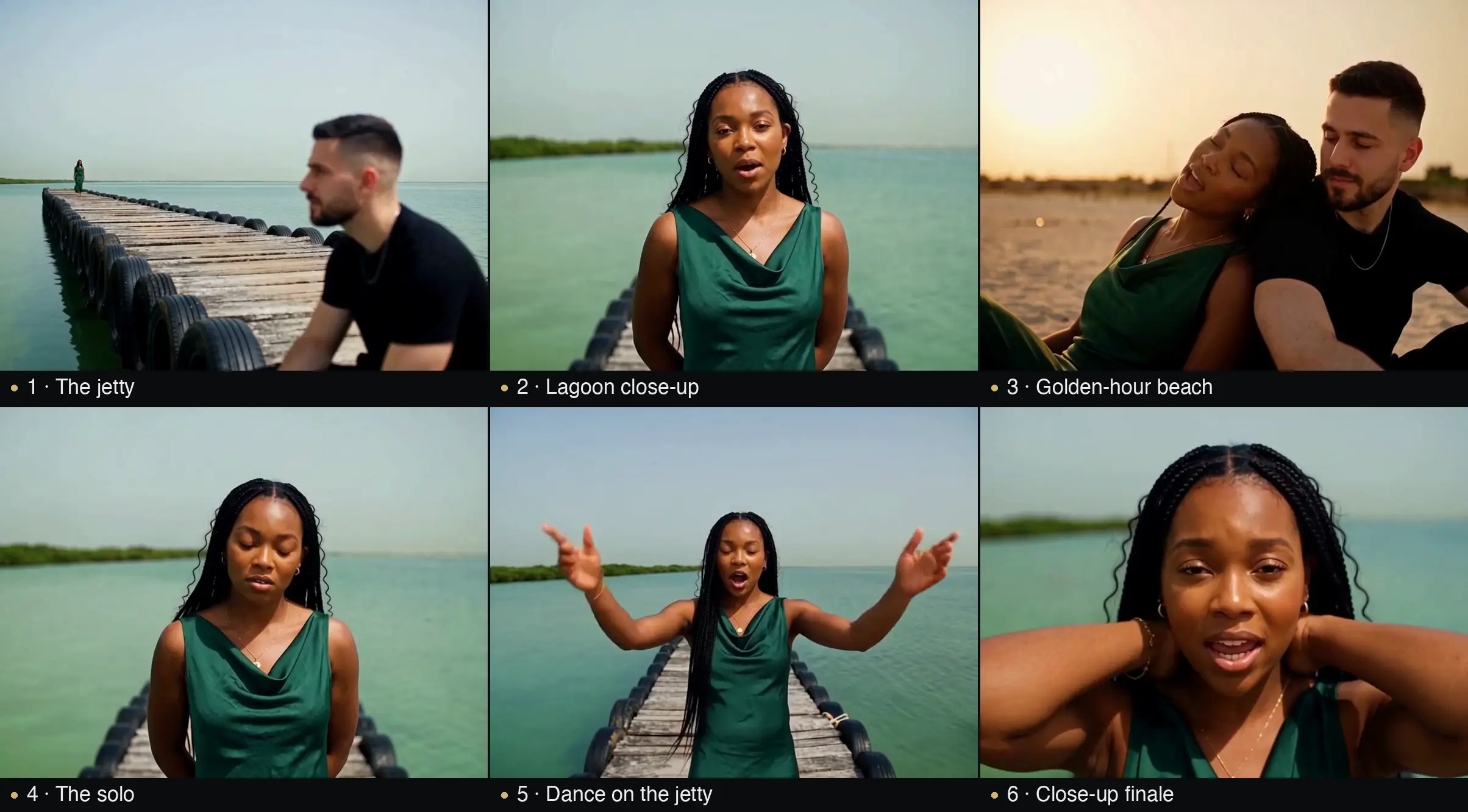
That grid isn't from the original trend — it's frames from a sample generated in Zixel with exactly the workflow below: two reference photos, one prompt describing the six shots. (It's rendered landscape here for easier reading; go 9:16 when you post to TikTok.)
That rigid structure is exactly why the trend works: viewers instantly recognize the format, and the only variable is *who's in it*. Which is why people search for a raindance AI video generator — they don't want to edit six clips themselves, they want to drop their photos into the template.
What You Need Before You Start
- Two photos — one for each role (you and your partner, friend, or sibling). Clear, front-facing faces, good even light, one person per photo. JPG, PNG or WebP.
- A Zixel account — sign up at zixel.vip.
- Seedance 2.5 credits — this is the model that handles multi-reference characters and multi-shot structure. Budget a few hundred credits per attempt at 720p.
- The original audio — you'll add "Raindance" when posting, not when generating (more on that below).
How to Make a Rain Dance AI Video in Zixel
Step 1: Upload your two photos as reference images
Open the AI Video generator, select Seedance 2.5, and switch the reference mode to reference images. Upload photo A (the role that opens the video on the jetty) and photo B (the singer). Seedance 2.5 accepts multiple reference images and keeps both characters consistent across shots — this is the key to a duet that actually looks like the two of you.
Step 2: Paste a prompt that describes the six shots
Don't describe "a couple dancing in the rain" — the trend isn't that. Describe the seaside structure. Here's the prompt template that works:
`` Vertical 9:16 cinematic music video at golden hour by the sea. Use the two people from the reference images. Shot 1: a man stands on a wooden jetty at sunset, the woman sings at the far end. Shot 2: close-up of the woman singing to camera by the lagoon. Shot 3: side by side on the golden beach. Shot 4: the woman dances solo by the water. Shot 5: on the jetty, arms out, the big dance move. Shot 6: close-up of the woman, straight to the lens on the final line. Warm sunset light, calm sea, shallow depth of field, expressive performance, smooth cinematic cuts. ``
Swap the roles and actions to match your photos. If you have a favorite version of the trend saved, you can also attach it as a reference video (up to 10 clips) so Seedance mirrors the camera work and choreography more closely.
Step 3: Set the parameters
- Aspect ratio: 9:16 (portrait) — the trend lives on TikTok, Reels and Shorts
- Duration: 12–15 seconds covers the six-shot structure
- Resolution: draft at 720p, re-run your winning take at 1080p
Generate. Results vary by photo, so expect to run it two or three times — small tweaks to the prompt (face the camera more, tighter close-up, warmer light) matter more than big rewrites.
Step 4: Add the original sound when you post
Here's the smart part: don't try to generate the song. Post your video to TikTok/Reels and attach "Raindance — Dave & Tems" from the platform's licensed music library. You get the exact audio everyone recognizes, the algorithm groups you with the rest of the trend, and you sidestep any copyright mess. Keep the generated clip's audio minimal or silent.
Tips for a Take That Looks Real
- Match the roles, not the screen — photo A is whoever should appear on the jetty first; the video doesn't care about left/right.
- One adult per photo, front-facing, evenly lit. Group photos and sunglasses confuse character mapping.
- Keep outfits simple — the AI has to re-dress your subject across six shots; plain clothing survives that better than logos and patterns.
- Lock the scene, vary the people — resist rewriting the whole prompt; the six-shot structure *is* the format.
- Draft cheap, deliver once — explore at 720p, regenerate the winner at 1080p.
FAQ
Is the Rain Dance AI video free? Zixel is pay-as-you-go: a 720p run costs a few hundred credits, and credits never expire. Failed generations are automatically refunded.
Can I use one photo instead of two? Yes — upload the same photo twice, or generate a solo version by keeping one character in every shot. The two-role duet is the version that's going viral, though.
Can I make the video with the original song? The generator creates visuals only. Attach the licensed track when you post — that's what every account in the trend does.
Does it work with pets or cartoon characters? Seedance 2.5 maps whatever's in the reference images. Cat duets have already appeared in the trend's example feeds — results are less predictable with animals, but that's half the fun.
Ready to Join the Trend?
The Rain Dance format is one of those rare trends where the entry cost is two photos and a few minutes. Grab your photos, open the Zixel AI Video generator, and put yourselves on that jetty before the trend moves on.